Scripture Memory Wallpaper - Romans 13

Romans 13

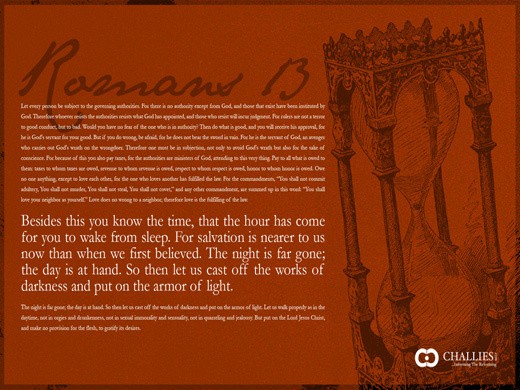
As you know, I’ve been enjoying memorizing passages of Scripture with readers of this site. To this point we have finished Psalm 8, Psalm 103 and Romans 12. We are hard at work on Romans 13. I thought it might be valuable to offer wallpapers for your desktop that tied in to the memorization program (though even if you are not participating you may enjoy them). I had a graphics designer come up with some designs and will link them each time we begin a new passage. Here, then, is a wallpaper you can download for Romans 13.

You can download it in four sizes:

1024 x 768, 1680 x 1050, 1600 x 1200, 1920 x 1200

Not sure how to change your wallpaper? Windows users click here, Mac users click here.

I hope you find them useful. In the coming weeks I’ll post wallpapers for Psalm 8, Psalm 103 and Romans 12.

Comments (18)

1
Anonymous's picture

Thank you for this!

2
Anonymous's picture

Thanks, Tim! When I try to download the 1680 x 1050, I get the dreaded Four oh Four!

3
Anonymous's picture

Thank you!

4
Anonymous's picture

Thanks, Tim! this is a great idea!

I have one small request…would it be possible to make a 1280 x 800 or 1280 x 1024? Currently I’m using the 1024 one, which works quite well, but some of the text is a tad blurry. Thanks again!

5
Anonymous's picture

Can I ask one small question? Why is Rom 13:12 repeated?

I really like it though. Very nice rendering.

6
Anonymous's picture

Thanks for the great idea! (perhaps you could tell us any neat ways to produce a scripture-desk top image ourselves??)

db

7
Anonymous's picture

Thanks, Tim! I love to keep scripture in front of me throughout the day. The wallpaper will definitely help.

8
Anonymous's picture

Thanks Tim, this is WAY cool!!

9
Anonymous's picture

love it…love it….love it…Did I mentioned that I love it?

Thank you!

10
Anonymous's picture

Thank you for this!

11
Anonymous's picture

Wonderful idea! I hope to use the other wallpapers as you get them ready. I have one adjustment to suggest, its a readability issue. Instead of using 2/3 of the screen width for the passage, I would use 4/5, leave the hourglass in it’s position in the background. Thanks for all your efforts.

12
Anonymous's picture

WONDERFUL IDEA! LOVE IT!One suggestion…could the font be larger? I know it can’t cover the entire background, but I have perfect eyesight and feel i have to squint to see it well.Thank you though! I love it!

13
Anonymous's picture

I love this, but is there any way it could be offered in different versions? I am using the NASB to memorize the scripture portions, so it would be nice to view it exactly as I have learned it.

14
Anonymous's picture

i would love to be receiving your mails coz am a born-again christian and would like to grow spiritually - read the bible and understand the word of God and always walk in a righteous manner.GOD BLESS YOU

15
Anonymous's picture

Tim-

Would it be possible to have the text on the right side of the screen. The default for icons is on the left and it would be easier to read if the chapter was on the right. This was a great idea. Thanks for your efforts.

Chris

16
Anonymous's picture

Tim,Thank you. This is very useful. I can now start memorizing anytime I am in front of my computer.W

17
Anonymous's picture

Thanks Tim

18
Anonymous's picture

Thanks this is great!