- RSS FeedSubscribe
- « Previous PostSite Upgrades and Updates
- Next Post »A La Carte (8/6)
Ten New or Redesigned Features
- 08/05/07
- 29
I wrote about my site yesterday and I’m going to do so again today. Please forgive what must appear to be narcissism. I don’t plan on posting about it again for a while after today. But because I added several new features in yesterday’s redesign, I wanted to introduce them to you and show you how they can make your life easier and can make all of your wildest dreams come true. That may be overstating it. But there are some neat features that may help you use this site better and help you enjoy other blogs more as well.
I’ll start with the main page:
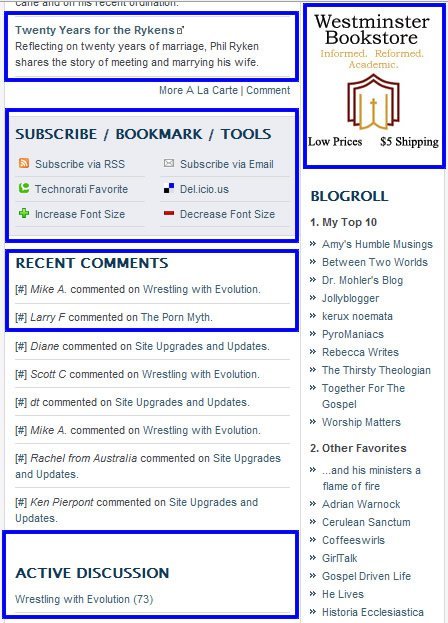
There are five things I’ve highlighted here:
- I know you already know about A La Carte, but I’ve now made it better, I think, by making the titles more descriptive. If you are a blogger, you’ll appreciate the value of having descriptive hyperlinks to your site. You can comment on A La Carte entries and in the very near future I’ll create a proper archive of all of the previous entries.
- I am going to tentatively add a little bit of advertising to the site. Just a little bit. What I’ve added here is just a link to a pay-per-click kind of program with Westminster Books. I don’t ever anticipate allowing the kind of overwhelmingly in-your-face advertising that a lot of blogs have! But this gives you a way you can support this site and support a good online retailer. And it’s as easy as a click.
- The Subscribe/Bookmarks/Tools area will let you subscribe to the site via RSS or email, add the site as a favorite at Technorati or Del.icio.us. And, of course, it the font is too small you can adjust it there. If you have never used Technorati, you may enjoy visiting it and perhaps making it a regular stop.
- The Recent Comments area will show you a list of the most recent comments, showing who made them and the topic of discussion.
- Finally, the Active Discussion area (which was at the top of the page in the old design) will show you a list of topics that have seen recent discussion. This tells you which topics are generating the most discussion.
Now we’ll turn to the interior pages.
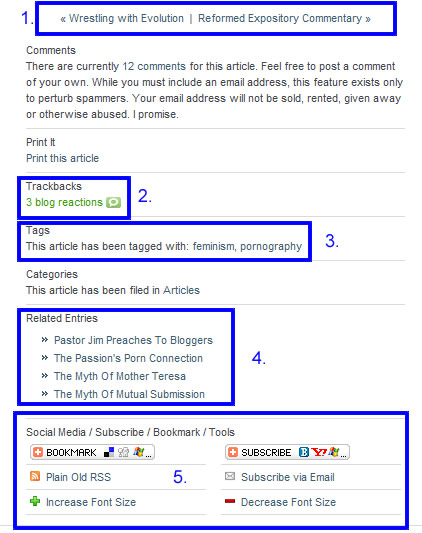
I’ve highlighted five things.
- These links are a simple way of navigating from one post to the next or previous one. Pretty simple, I admit, but handy if you want to read a few pages or want to catch up with discussion on multiple articles.
- One of the most interesting aspects of blogging is how one blog influences others and how bloggers interact with each other. This Technorati link is a simple way of seeing what other bloggers are saying about a particular story. If you are a blog reader, you can click this link to read other opinions on the article I’ve written. If you have a blog of your own and link to an article I’ve written, it should automagically appear here and allow people to navigate from my site to your own.
- I’m a latecomer to the tagging game, but have finally added them. Tags allow a simple method of marking the content of a post for later reference and of building relationships between various posts. Clicking on a tag will take you to a search function that will find a list of similarly-tagged stories. Because I’ve only just begun tagging it will take a bit of time for the full power of this feature to become obvious.
- The Related Entries area uses a database search to come up with stories that are somehow related to this one. It is a bit hit-and-miss at times, but typically does pretty well with coming up with related entries. So if the current article interests you, you can click on the tags or on the related entries to read more.
- If you are a user of social media, you can now link any article to just about any social media platform. Alternatively, if you want to subscribe to the RSS or email feed, you can do so here.
And one bonus feature: the “Submit” button should now be disabled as soon as you post a comment, meaning that we’ll see fewer double posts. The server is still a bit slow but at least we should no longer have multitudes of repeated comments!
So there are ten features, some new and some merely redesigned, that I hope will make browsing this site more enjoyable. Tomorrow we’ll return to more normal programming.

I am a follower of Jesus Christ, a husband to Aileen and a father to three young children. I worship and serve as a pastor at
Releasing on April 1, The Next
Comments (29)
All of these are good improvements, Tim. I think this new design is much more user-friendly than the last one. Great job!
I agree, but I do miss the old one already
So all I have to do is put a link from a post in my blog to yours and it’s automatically a trackback? I’ve never quite understood how to use this feature—thanks! I also like the link to comments at the top AND bottom of your articles. I see you went with Challies Dot Com :: Informing the Reforming. Good show!
Your new site looks fine in Internet Explorer, but is unreadable in my preferred browser, Firefox 2.0.0.6. According to recent statistics (that may or may not be accurate), Firefox share is 18 percent in the US and 28 percent in Europe. See http://www.pcworld.com/article/id,134615-c,mozilla/article.html .
My comment is not a plea for everyone to use Firefox; just a comment that I don’t want you to lose any potential readers. I like your site enough to be willing to read in in whatever browser I need to use.
For myself in Firefox/2.0.0.6 to me it looks very nice … I may have to tear apart the code so I can cannibalize the ideas for later :) IE7 looks good, not sure about IE6 Even Opera looks nice so I would bet I can read it on my Wii too.
Great use of CSS very usable w/o the CSS enabled. XHTML too, can’t go wrong! No W3c.org validation … still very usable.
Your new site looks fine in Internet Explorer, but is unreadable in my preferred browser, Firefox 2.0.0.6
Try refreshing your browser or clearing your cache. I assure you it works just fine in Firefox 2.x.
Crimminy Tim! Don’t you have a 24-hour help desk??
Tim this might be a silly question, but are you ever planning on redesigning or changing the Icon for your site? Currently it looks like the infinity sign, but maybe it is your Challies logo on an angle? Just thought with a new design, maybe a new Icon could be the go?
I’ve thought of it. It’s actually a C, a dot, and a C (which stands for Challies Dot Com, of course)…
A lot better Tim. Much faster, type is more legible, and pleasant shades. It does look fine in Firefox, and although you’re a far more talented designer than myself (just a hobby), I’m sure you’d admit that life would be a lot easier if people did convert to FF.
One thing, I do think the shade (at least on my screen) of the small text in the footer is too similar to the background. Maybe change it too the off-white of the main content background?
Anyway, nice work brother.
Not sure if I confused you, but I wasn’t talking about the logo (the C a dot and a C), but the icon that appears in the toolbar, RSS Feed, Favorites etc? Or is that suppose to be a C, dot, C as well?
Not sure if I confused you
You did confuse me. Then again, maybe I’m just tired. I assume then that you’re referring to the favicon? That little “gears” icon? That’s a good question. I do need to put a new one on there at some point. Any ideas?
It was probably a bit of both.
Well if you’re going to keep the C.C logo on your site, then why not a C.C graphic for the Favicon? Unless of course you could get Joel Osteen’s smile to fit into 16x16? ;)
why not a C.C graphic for the Favicon? Unless of course you
Mostly because I’ve had a tough time getting it to look good in sixteen pixels…
It is a difficult task. I have used a program before called Icon Constructor, which was pretty good, but anything complicated still turned out rather poor. I don’t understand how some people have really clear almost ‘photos’ of themselves as Favicons. There must be a real art to it.
Anyone else have any suggestions?
Yes, clearing my cache and reloading the page makes it OK. in Firefox. Sorry for the false alarm.
I love how the comments read, easier on the eyes. Great re-design….
And like your little pop up message about how I need to “think before posting!” =)
Hey, I’ll trade you a nifty favicon for the snippet of code that disables the comment submit button. When my server is chugging, sometimes visitors leave 5 or 10 copies of the same comment, and it’s a real pain to have to clean up after. What do you say?
What do you say?
Sounds like a deal to me.
I know of very few people who are more skilled with their hands than my uncle. The house that he and my aunt moved into last year (and will probably be in for the rest of their lives) was designed fully by him and (with the exception of the basic structure) was built fully by him. About 6 months before they moved in, he was showing me what he had done, and what he still had left, both of which included some really cool stuff.
I would’ve had to have been pretty narcissistic myself to think that he was being narcissistic. In addition to the obvious parallel between you and my uncle, I’m not moving into their house. What kinda goof wouldn’t want to be “shown around” a place where they’re gonna hang out?
Though the “make all of your wildest dreams come true” comment was over-the-top. Which means I loved it! Sounds kinda Adams-esque to me. Interesting that he appears in your A La Carte today.
Though the “make all of your wildest dreams come true” comment was over-the-top. Which means I loved it!
I kind of stole it from Napoleon Dynamite. Vote Pedro!
Though the “make all of your wildest dreams come true” comment was over-the-top.
Tim is obviously echoing Pedro’s campaign speech in “Napolean Dynamite.” Vote for Pedro!
Tim, great minds…
Tim, great minds…
Indeed!
I have to tell you that if I had the skills to design as you do I would blog every single day. I don’t care what category of blogging you compare it to this is by far the best designed site I have seen … and it keeps getting better.
Keep up the great work.
Tim,
I know I’m probably the only one on the planet still using IE 6, but in case there are two of us, I figure you’d want to know that the sidebar gets pushed to the bottom. (Please forgive if this is a duplicate comment…didn’t read the other thread.)
I know I’m probably the only one on the planet still using IE 6, but in case there are two of us, I figure you’d want to know that the sidebar gets pushed to the bottom.
Well isn’t that odd. I checked it yesterday in IE 6 and it seemed to work fine. Maybe it will revert to more normal behavior tomorrow. If not I’ll have to try to figure out why it’s misbehaving.
OK, I checked it out over the weekend and it was fine. Then I came over today and the sidebar was all pushed down to the bottom. I hit “refresh” just to make sure, since I remember it working correctly before. Now, it is back to being fine.
Sorry to give your design any bad vibes. It took a lot of effort to come out of lurkdom (AND click over from RSS), and it was all for nothing! I do think this is a great one, though!
I like the Favicon Tim. :)