
As time goes on, I find myself doing more and more of my reading on my Kindle, and taking advantage of its super-simple ability to make notes and highlights. At the same time, I find myself relying on Evernote to help me retain and organize information. Books hold the information I want to know while Evernote holds the information I want to retain. When I put the two of them together, I get a powerful system to record and remember what I have read. Let me share a simple technique to quickly and easily get every one of your Kindle notes and highlights into Evernote.
Install Evernote Web Clipper
Before you do anything else, visit Evernote and install their Web Clipper browser extension, available for all major browsers.
Visit kindle.amazon.com
Once you have installed the Web Clipper, you are ready to track down your notes and highlights. Visit http://kindle.amazon.com and sign in using your Amazon username and password:

Locate Your Book
After logging in, click on “Your Books” to see a list of the books you own in Kindle format:

Click the title you would like to export to Evernote:

Note: If you have a huge library, see my note below titled “For Big Libraries.”
Find Your Highlights
Click on “You have X highlighted passages:”

Use Evernote’s Web Clipper
You will now see a page with a simple listing of all of your notes and highlights, just like this:

Note: Do not scroll all the way to the bottom of this page; for some reason, doing that will automatically load the highlights from the next book on the list.
Click the Evernote Web Clipper icon in your browser:

Choose what notebook you’d like to save your highlights to, add any tags you would like associated with them, and then click “Save.” Be sure to leave “Article” selected under the “Clip” heading.

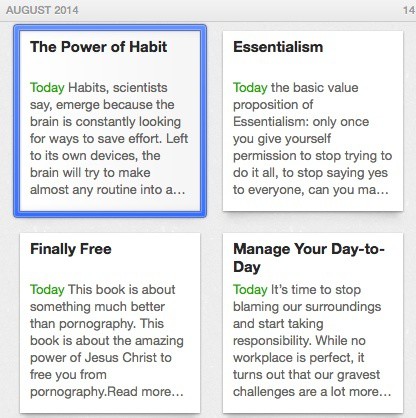
Give Evernote a few seconds, and it will save every one of your highlights. Now simply open up Evernote, and allow it to synchronize. And just like that, you will have all your highlights saved forever:
For Big Libraries
Let me add one note for people with extensive Kindle libraries. When you click “Your Books,” you may find that you have too many to easily list there. In that case, you can use the search function. When you search, it appears that Amazon finds the printed edition of the book rather than the Kindle edition. This means that you will need to look to the sidebar where it says, “You have a different edition of this book.” Click “different edition” and you will be all set. Then carry on with the step above under the heading “Find Your Highlights.”

There are two great benefits to moving all your highlights to Evernote. The first benefit is searchability—your highlights and notes are now searchable in Evernote. When you search for a topic you may be surprised to learn that it was covered in a book you read; not only that, but Evernote retains the location information, so you can return to the exact spot and read the surrounding context. The second benefit is retention—you can return regularly and skim through your highlights to remind yourself of the book’s key points. This is an effective technique for retaining information and ideas.
So there you have it. Kindle + Evernote = ♥.
(Bonus Idea: If you have a membership at Books at a Glance, do the same thing with their book summaries–add them to Evernote!)